Wealth
Assets
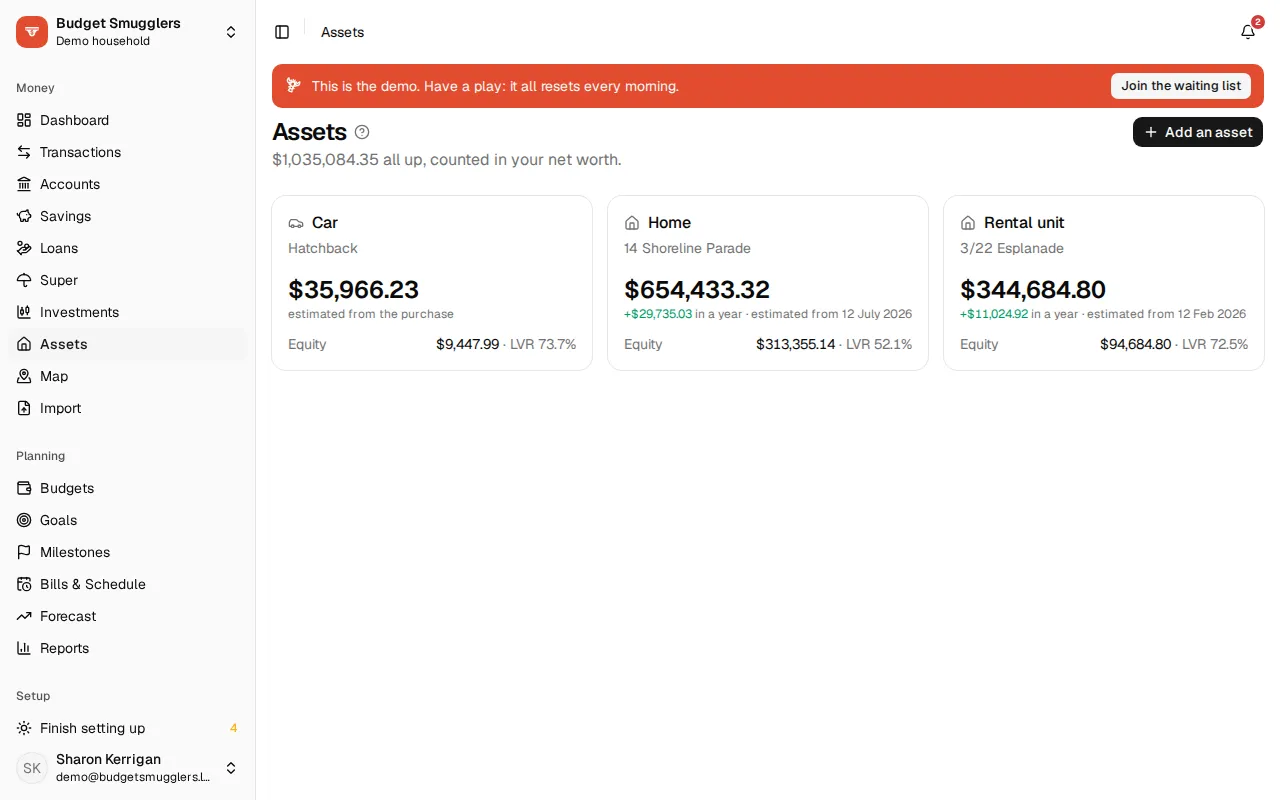
Count your home, car and other things you own in net worth, with values that keep up to date, plus equity and LVR against your loans.
A home, a car, a boat: things you own that count in net worth but aren’t money in a bank. Without them, a home loan makes net worth look far too low, because the loan counts and the house doesn’t.
Adding one#
Open Assets and choose Add an asset. Pick the Kind (Property, Vehicle or Other) and give it a Name. Then fill in:
- Paid and Bought on. Net worth includes it from that day, so past months are right too.
- Worth now and As at, if you have a recent estimate or valuation. You can give this instead of the purchase, or as well.
- Change a year (%). Growth for a home (say 4%), or a loss for a car (say −15%). Cars usually lose 10–20% a year. It’s used to estimate the value after your latest valuation.
- Never below, for a vehicle. The estimate never drops under it. Handy for a car’s scrap value.
- Loans against it, for equity. Net worth already counts the loans, so linking one doesn’t change net worth.
You can also add an account with the type Asset (home, car) on Accounts, then choose Set up its value on it.
How the value is worked out#
Every value you enter is an anchor: the purchase, and each valuation after it (a bank valuation, an online estimate, an appraisal).
- Before the first anchor it’s worth nothing to you, because you didn’t own it yet.
- Between two anchors the value moves at a steady rate from one to the next. The history passes through every value you entered. The yearly change isn’t used here, because what happened is known.
- After the latest anchor it’s estimated from the yearly change, compounding, and never below the floor.
The Value over time chart shows month-end values, with estimated months as a dashed line.
Values are worked out whenever they’re read. An estimate is always up to date, and a new valuation reshapes the history straight away. Nothing is written to your transactions.
Updating the value#
On the asset’s page, choose Update value under Values. Enter what it’s Worth, the date, and a Source if you like (a bank valuation, an online estimate). Edit or remove a value from the same list.
With two or more values at least three months apart, the page shows the yearly change they work out to and offers to use it. Your rate is never changed for you.
Equity and LVR#
Link the loans secured against an asset (Link a loan on its page) to see:
- Equity: the value less what’s owing.
- LVR (loan to value ratio): what’s owing as a share of the value, the way a bank works it out.
- After offsets: what’s owing less the money in the loans’ offset accounts.
The value chart also shows what’s owing. See loans and offsets for setting up the loans themselves.
Looking ahead#
With a loan linked, Looking ahead charts the value against your loans as they’re going now. Drag Growth a year to try a different rate, and Back to returns to the asset’s own rate.
It shows when you’re likely to drop under 80% and 60% LVR. Set a Target LVR (%) to add your own line, and save any of them as a milestone.
Cost of owning#
Cost of owning puts interest, fees and running costs against rent and what the asset gained in value. It shows recent months and an estimate for the next 12.
Choose Categories to say where its costs go: rates, insurance, strata and upkeep. Mark each one as a Cost, or as Income for rent. Pick an account to count only that account’s transactions in the category.
For a rental, it also shows the Rental yield, before and after costs. To see the return On your cash, edit the property and fill in Your own money in it (deposit, stamp duty and fees). Leave it blank and it uses the price less loans.
Selling#
Choose Sold it and enter what it Sold for and the date. The asset drops out of net worth from that day. The money from the sale turns up in your bank account, and the asset’s history stays. Not sold after all puts it back.
Remove takes it out of net worth entirely, past months included.
Net worth and goals#
- Net worth counts each asset at its month-end value, and shows how much of the total is assets.
- Asset accounts take valuations, not transactions. They’re left out of spending, budgets, the forecast and imports.
- A net worth goal measures growth from the day it started. Adding an asset, or changing its history, moves the goal’s starting point by the asset’s value on that day. Adding a house won’t finish the goal on the spot, but growth in its value since the goal started still counts.