Wealth
Savings accounts and term deposits
Track interest on savings accounts and term deposits, keep bonus-rate conditions on track, and see where your balance is heading.
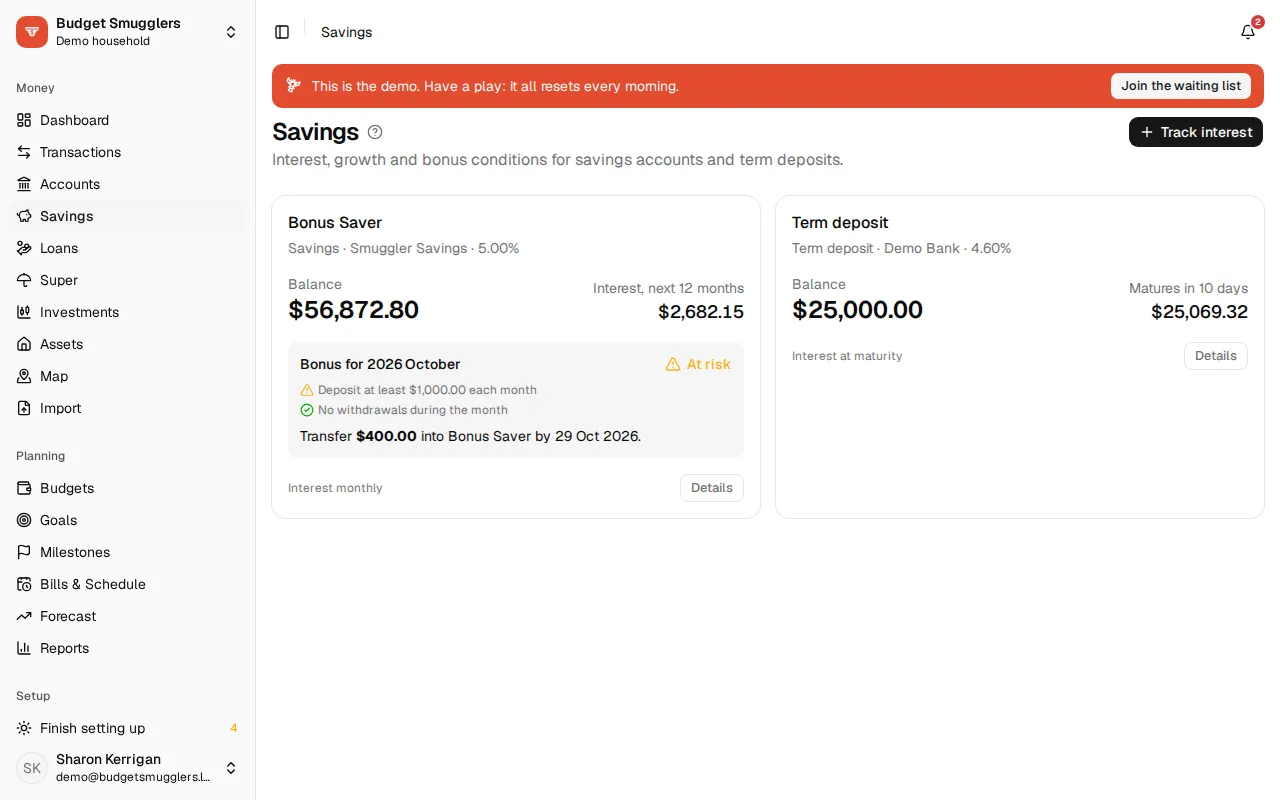
Savings tracks the interest on your savings accounts and term deposits. It projects the growth, checks the interest you’re paid, and watches bonus conditions so you don’t miss a month.
Setting up interest tracking#
- Open Savings and choose Track interest.
- Pick the Account. Savings, term deposit, everyday, offset and cash accounts all work.
- Choose the Kind: Savings account or Term deposit.
- Set how often Interest paid: monthly, quarterly or yearly (term deposits can also pay at maturity), and on which day.
- Enter the rates (see below).
- Choose where interest goes. This account (it compounds) is the usual one.
- Choose Set up.
If the account already has interest credits, we suggest a rate from them.
Transfers take (business days) is how long a transfer from another bank takes to land. Use 0 for instant transfers. It’s used to work out “transfer by” dates for bonus conditions.
To change the terms later, open the account’s Setup tab. Stop tracking interest removes the rates, conditions and alerts. The account and its transactions stay.
Term deposits#
For a term deposit, also enter the Amount invested, when it Started and when it Matures. Then choose what happens At maturity:
- Roll over principal and interest
- Roll over principal, pay out interest
- Pay everything out
Remind me (days before) sets when you’re told it’s about to mature. The card on Savings counts down the days.
Interest rates#
Savings accounts can have three kinds of rate:
- Base: paid on the whole balance, always.
- Bonus: paid on top of the base, only in periods where every bonus condition holds. Bonus paid up to caps the balance the bonus applies to.
- Intro: replaces base and bonus, with no conditions, until Intro rate ends.
A term deposit has a single Rate (%).
The Interest tab keeps the full rate history. To record a rate change, choose Add a rate, pick the Kind and the date it started. Only on balances up to handles rates that apply to part of the balance.
Rates from your interest credits#
We check each interest credit against your rates. When the interest paid points to a different rate, it shows under From your interest credits and a Rate to check badge appears on the account. Confirm it if it matches your account, or Dismiss it. Re-check credits looks again.
Interest credits are picked out of the account’s transactions for you. On the Transactions tab you can tag any we missed as Interest, Bonus interest, Deposit or Withdrawal, or mark a row Ignore for conditions (a bank correction, say).
Bonus conditions#
Most bonus savers only pay the bonus when you do certain things each month. Add them on the Bonus conditions tab, and all of them need to hold for the bonus to be paid.
Start from a template, then adjust:
| Condition | What it checks |
|---|---|
| Minimum deposits | Deposits add up to at least an amount. Optionally, each deposit must be a minimum size. |
| Balance grows | The balance ends the period higher than it started, by at least an amount. Interest can be left out. |
| Limit withdrawals | No more than so many withdrawals, or up to a total. |
| Card purchases | A number of card purchases on a linked account, optionally only rows matching a pattern. |
| Minimum balance | The balance stays above an amount, checked at the end of the period or every day. |
For deposits, What counts can be any deposit, only money from outside your accounts, or anything except transfers from the same bank. Match it to your account’s terms.
A condition can watch an account in another of your pools, like a card in your business pool.
Choose Save conditions when you’re done.
Tracking this month#
The tracker at the top of the tab shows the period, what the bonus is worth, and each condition as Met, On track, Too early to tell, At risk or Missed. It’s based on what’s happened so far plus your scheduled bills and income.
When a bonus is at risk, it tells you what to do: transfer a set amount by a date, hold off a planned withdrawal, or make a few more card purchases. Transfer-by dates allow for weekends but not public holidays.
Track record shows which periods earned the bonus, and roughly what missed bonuses have cost you so far.
The Dashboard has a Savings bonuses card with every tracked account’s conditions at a glance.
Planning a top-up#
We can’t move the money for you. But next to a suggested transfer, Plan the transfer books it in:
- Choose Plan the transfer.
- Pick the account it comes From, and check the Amount and date.
- Choose Plan it.
The condition shows as on track, and the transfer counts in the forecast. Make the real transfer in your banking app. It matches off when it imports.
Warnings#
You’ll get a notification when:
- A bonus is at risk, with the amount to transfer and the date to do it by.
- A bonus can’t be met this period.
- A term deposit is about to mature.
- A balance is over its bonus cap and only earning the base rate on the rest.
Emails for these are on by default. Change them under Settings › Notifications: Email me about savings bonuses and term deposits, and how many days before the transfer-by date to Email about a bonus at risk.
Projections#
The Overview tab shows the balance, the rate now, the bonus cap and the Interest, next 12 months. A term deposit also shows what you’ll have At maturity.
Growth charts the actual balance so far, then the expected path with your scheduled deposits. With bonus conditions, it also shows the path with every bonus met and on the base rate alone.
What if…#
Try a change and see where you’d end up:
- An Extra deposit every week, fortnight or month.
- A Lump sum in or out on a date.
- A Rate change (% points).
- Years ahead, and a Target balance to see when you’d reach it.
Saving for something specific? A goal can track it.